Software · 9 min read
Rendering software for architects: D5, Enscape, Lumion and Twinmotion compared
Four real-time renderers are the ones architects and interior designers search for most: D5 Render, Enscape, Lumion and Twinmotion. All four turn a 3D model into still images, walkthrough videos and 360° panoramas in minutes rather than hours. They differ in how they connect to your modelling software, what they cost, which computers they run on and how much they can do on their own. This guide compares them as they stand in October 2026.
The short answer
- You want renders without leaving Revit, SketchUp, Rhino, Archicad or Vectorworks: Enscape. It runs inside them, on Windows and on Apple Silicon Macs.
- You want the most for the least money, on a Windows PC: D5 Render. Pro costs $360 a year, and the free Community version is enough to learn on.
- You make landscaped exteriors and films, or work from AutoCAD: Lumion, the most expensive of the four at $1,149 a year.
- You are a student or a studio earning under $1 million a year, on a Mac or a PC: Twinmotion, which is free for you.
- You need one final image as photoreal as possible, and can wait for it: V-Ray, alongside any of the above.
Inside your model, or beside it
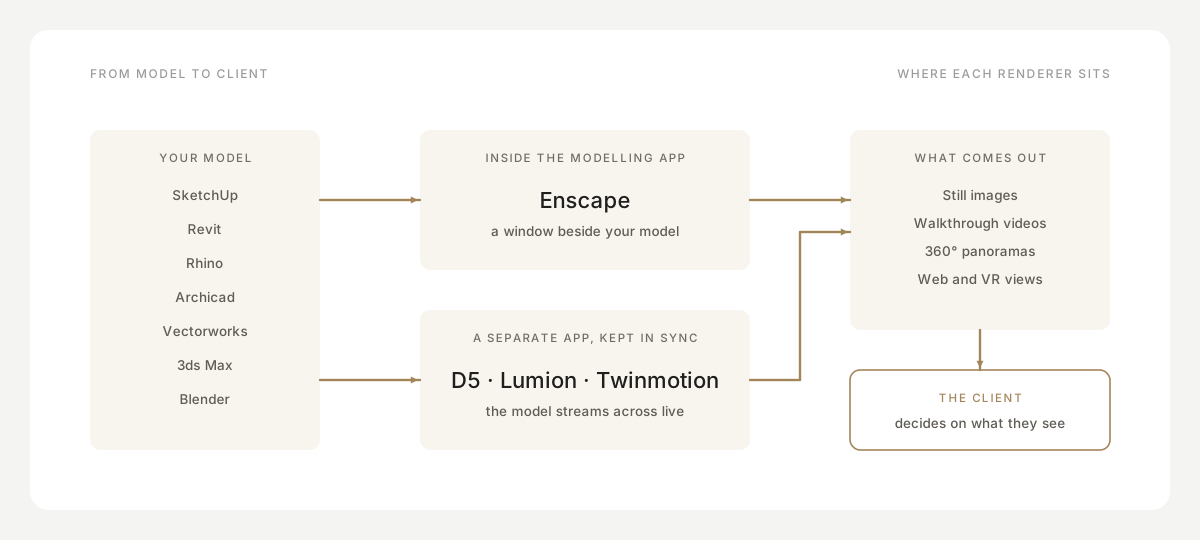
The biggest difference is where the renderer lives. Enscape runs inside your modelling software: you press a button in Revit, SketchUp, Rhino, Archicad or Vectorworks and a live, rendered window opens beside your model. Change a wall and the render changes with it. There is nothing to export and no second copy of the project to keep up to date.
D5 Render, Lumion and Twinmotion are separate programs. A small plugin in your modelling software streams the model across, and keeps it in sync while both are open. Inside the renderer you then add what your model doesn't have: trees and planting, people, cars, weather, furniture from a large library, camera paths for animation. That gives richer scenes and better films, at the cost of a second program to learn and a scene that lives outside your main file.
So a rough rule: if you want quick, honest views of the design while you are still designing it, a renderer inside your model is hard to beat. If you want a finished, landscaped, populated scene and a short film for a client, a standalone renderer gives you more.
Side by side
Prices are each vendor's own list prices for one person for a year, as published in October 2026. Chaos shows Enscape's price in your local currency; the euro price is the one we could confirm.
| D5 Render | Enscape | Lumion | Twinmotion | |
|---|---|---|---|---|
| Price a year | Pro $360 (or $38 month to month) | Solo €538.80 (or €91.90 month to month) | Pro $1,149; no monthly plan | Free under $1M revenue; otherwise $445 |
| Free version | Community, for non-commercial use | No; 14-day money back | No | Yes, under $1M revenue |
| Students | Free | €134 a year | Free | Free |
| Windows / Mac | Windows only | Both (Apple Silicon Macs) | Windows only | Both (Apple Silicon; no path tracer or VR on Mac) |
| How it runs | Separate app, live sync | Inside your modelling app | Separate app, LiveSync | Separate app, Direct Link |
| Works with | SketchUp, Revit, Rhino, Archicad, 3ds Max, Blender, Vectorworks, Cinema 4D | Revit, SketchUp, Rhino, Archicad, Vectorworks | SketchUp, Revit, Archicad, Rhino, AutoCAD, Allplan, BricsCAD, Vectorworks and more | SketchUp, Revit, Rhino, Archicad, Vectorworks, 3ds Max, Allplan, BricsCAD and more |
| Minimum graphics card | GTX 1060 6 GB, RX 6400 or Arc A3 | 4 GB, Vulkan 1.2 (GTX 10-series) | 6 GB (GTX 1060) | 6 GB; RTX or RX 6000 for the path tracer |
| Asset library | 16,000+ on Pro | 6,700 on Solo, up to 18,500+ | 10,000+ | Over a million, through Megascans and Sketchfab |
| Latest version | 3.1, July 2026 | 4.21, October 2026 | 2026.1, July 2026 | 2026.1, April 2026 |
D5 Render
D5 Render, from Dimension 5, is now the most searched-for of the four on Google, and in India by a wide margin. It is a standalone Windows program: plugins sync your model from SketchUp, Rhino, Archicad, 3ds Max, Blender and Vectorworks, and a separate D5 Sync plugin covers Revit. Its lighting uses real-time ray tracing, with a path-traced mode for final images.
Its case is value. Pro costs $360 a year when paid yearly, a third of Lumion's price, and brings more than 16,000 assets, more than ten AI tools and web tours you can password-protect and send to a client. The free Community version is limited to non-commercial work, so a practice billing clients needs Pro. The catch: there is no Mac version, and it needs a graphics card that supports ray tracing.
Enscape
Enscape, made by Chaos (the company behind V-Ray), is the one that lives inside your modelling app. It works with Revit, SketchUp, Rhino, Archicad and Vectorworks, and opens a rendered window that follows your model as you change it. That makes it the natural choice for design-stage views, and for Revit-based practices in particular.
With Twinmotion, it is one of only two of the four with a native Mac version, for Apple Silicon Macs. Prices are per named user in three tiers (Solo, Premium and Collection, from €538.80 a year), each now with a monthly allowance of AI credits. There is no free version. The Solo library, 6,700 assets, is smaller than the standalone renderers', and cinematic animation comes only with Collection. To share with a client, it offers VR, QR-code sharing and a standalone viewer export.
Lumion
Lumion is best known for quick, landscaped exterior views and films, and its free LiveSync plugin reaches a long list of CAD programs, AutoCAD, Allplan and BricsCAD among them. It has more than 10,000 models and materials, AI tools to enhance images and generate materials, and ray-traced 360° panoramas a client can open in VR from one link.
It is also the most expensive: Pro costs $1,149 a year, billed upfront, and there is no monthly plan. It runs only on Windows. Its newest addition is Lumion Cloud, a web space for sharing work and gathering feedback, free while it is in beta. Students and teachers get Lumion Pro free.
Twinmotion
Twinmotion belongs to Epic Games and is built on Unreal Engine, which gives it Unreal's Lumen lighting and access to more than a million assets through Megascans and Sketchfab. It links to most design programs through Epic's Datasmith Direct Link, and Revit 2024 and later have the link built in.
Its licence is its strongest argument: Twinmotion is free for students, schools and any individual or company with less than $1 million in revenue over the past twelve months, which covers most small studios. Above that, a seat costs $445 a year. It runs on Windows and on Apple Silicon Macs, but the Mac version has no path tracer and no VR.
Head to head
Enscape vs Lumion
Choose Enscape if you want renders while you design, inside Revit or SketchUp, or if you work on a Mac. Choose Lumion if your work ends in finished exterior films with planting, people and weather, and you are on Windows. Enscape Solo also costs roughly half as much a year as Lumion Pro.
D5 Render vs Enscape
D5 is cheaper and does more on its own: larger library, AI tools and shareable web tours. Enscape needs no export and runs on a Mac. You can also use both: Enscape while designing, D5 for the final set.
Lumion vs D5 Render
Both are standalone Windows programs for finished scenes. D5 costs less than a third of Lumion and has a free tier to learn on; Lumion connects to CAD programs D5 doesn't, such as AutoCAD, Allplan and BricsCAD, and has Lumion Cloud for feedback. On price alone, D5 wins.
Twinmotion vs Lumion
For a small studio, Twinmotion's free licence is hard to argue with, and it runs on a Mac. Lumion is made for architecture alone, with its library and effects built around landscaped exteriors; Twinmotion opens the door to Unreal Engine if you later want interactive work.
Twinmotion vs Enscape
Both run on Apple Silicon Macs. Enscape is simpler and lives inside your model; Twinmotion is a separate program with far more assets, and free under the revenue limit.
Where V-Ray fits
V-Ray, also from Chaos, is not a real-time renderer in the same sense. It runs inside 3ds Max, SketchUp, Rhino, Revit and others, and renders on the processor, the graphics card or both, more slowly and more precisely. It pairs well with any of the four: present day to day in a real-time renderer, and keep V-Ray for the few hero images that must be photoreal. Version 7 is current; an update in April 2026 added real-time viewport rendering.
The computer you need
All four depend on the graphics card more than anything else, and above all on its memory. As a working minimum, plan for 6 GB of graphics memory (an NVIDIA GTX 1060 or better); Enscape will start on 4 GB. For comfortable work on real projects, the vendors recommend more: Enscape suggests 8 GB (an RTX 3070 Ti or RX 6800), Lumion 10 GB (such as an RTX 3060).
Ray-tracing hardware matters most for D5, which requires a card that supports it, and for Twinmotion's path tracer, which needs an NVIDIA RTX or AMD RX 6000 card with 8 GB. On a Mac, only Enscape and Twinmotion run natively, and only on Apple Silicon.
From the render to the client's decision
Whichever tool you choose, the render isn't the end of the job. A client still has to look at it, understand which room it shows, and say yes or ask for a change. Renders sent loose over WhatsApp or email lose that context: the client can't tell the living room view from the dining room view, and their comments arrive scattered across chats.
Show each render with the plan, so the client knows where they are standing, and next to the materials and pieces it depicts. If you have used an AI tool to restyle or enhance an image, say so on the image: a client who approves an AI concept of a lamp that can't be bought is a problem later.
In practice
In Enfilade, your renders become the pictures of each room in a design book built on your floor plan. The client opens one link on any phone, walks the home room by room, pins a note on the exact render they want changed and approves each room, with every decision kept with a name and a time.
Questions
What is the best rendering software for architects?
It depends on how you work. Enscape suits architects who want renders inside Revit, SketchUp, Rhino, Archicad or Vectorworks. D5 Render gives the most for the money on Windows. Lumion suits landscaped exteriors and films. Twinmotion is free for studios under $1 million in revenue.
Is D5 Render free?
D5 Render Community is free, but only for non-commercial work. D5 Render Pro costs $360 a year, or $38 month to month, and D5 is free for students and educators.
Which rendering software works on a Mac?
Enscape and Twinmotion run natively on Apple Silicon Macs (not Intel Macs). D5 Render and Lumion are Windows only. Twinmotion's Mac version has no path tracer and no VR.
Is Twinmotion free?
Yes, for students, schools, and any individual or company with less than $1 million in revenue over the past twelve months. Above that, a seat costs $445 a year.
Do I need an RTX graphics card?
For D5 Render, you need a card that supports ray tracing. Enscape, Lumion and Twinmotion run without one, though Twinmotion's path tracer needs an NVIDIA RTX or AMD RX 6000 card, and Enscape uses ray tracing in full only on NVIDIA RTX cards.
Keep reading
- Practice · 4 min readHow to present an interior design concept to a clientHow to structure and deliver an interior design presentation that wins client approvals: room by room, anchored to the floor plan, with zero confusion.→
- Practice · 4 min readInterior design mood boards that clients understandHow to build interior design mood boards clients understand: layout tips, material board differences, curation tools, and collecting clear feedback.→
- Plans and drawings · 5 min readHow to read a floor planLearn how to read architectural floor plans step by step: understand scale, wall thickness, dimensions, door swings, window symbols, and notations.→